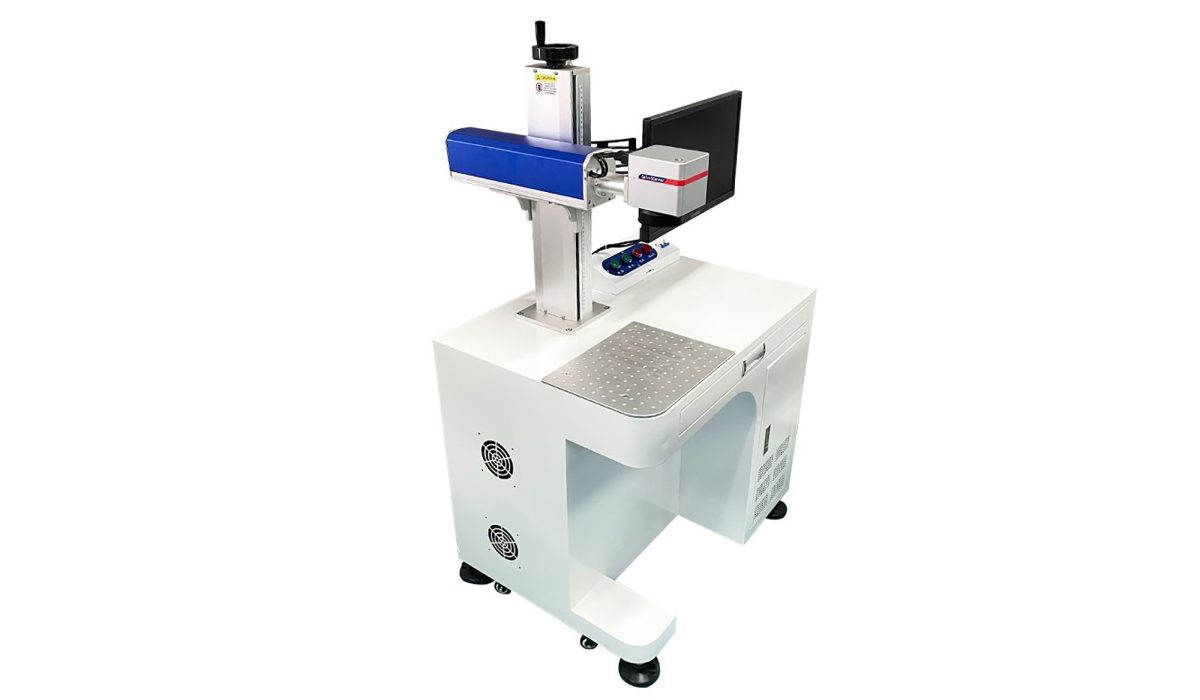
Fiber laser marking machines are the industry standard for permanent, high-contrast marking on metals and engineering plastics — used everywhere from automotive part traceability and medical device UDI coding to consumer electronics logos and custom jewelry engraving. This guide walks you through how fiber lasers work, the four main machine types, how to pick the right wattage (20W vs 30W vs 50W vs 100W), which materials they can and cannot mark, real-world 2026 pricing, and the mistakes to avoid when buying. Whether you are sourcing your first machine or upgrading an existing production line, you will leave with a clear decision framework.
On this page
- Trust & Credentials
- What Is a Fiber Laser Marking Machine & How Does It Work?
- Fiber Laser Marking Machine Types
- Power Guide: 20W vs 30W vs 50W vs 100W
- Materials Fiber Lasers Can (and Cannot) Mark
- Key Industries & Applications
- Fiber Laser Marking Machine Price (2026)
- How to Choose the Right Machine
- Installation, Safety & Maintenance
- Fiber vs UV vs CO₂: Which One Do You Need?
- Frequently Asked Questions
Trust & Credentials
Why Manufacturers Work With FLS Laser
FLS Laser is a direct laser equipment manufacturer, not a trading company. Founded in Shenzhen in 2011, we develop our own laser sources, galvanometer scanning systems, control boards and laser software in-house — a complete technology chain from core components to finished machines.
- Certified to international standards — our machines are built to CE, FDA and ISO requirements, and every unit undergoes a 72-hour full-load aging test and insulation withstand-voltage test before dispatch.
- Verified innovation record — a recognized National High-Tech Enterprise in China, with 38 patents, 25 software copyrights and 7 registered trademarks.
- Global install base — equipment exported to customers across 20 countries, supported by English documentation, operation videos and remote online training.
- Free sample marking — send us your workpiece and our engineers return photos and video of the finished mark within 24 hours.
Documented Customer Results
Case: a Tier-1 automotive electronics supplier
- Case: a Tier-1 automotive electronics supplier
- Challenge: Traceability codes on connectors and ECU housings were applied by ink
- pad printing and adhesive labels. The marks faded and peeled after thermal cycling
- (−40 °C to +125 °C) and solvent exposure, first-read rates were unreliable and the
- marks failed customer traceability audits; manual loading onto the pad printer also
- capped line throughput.
- Solution: An FLS 30W fiber laser marking machine (1064 nm, air-cooled) integrated
- with a custom indexing conveyor and an inline CCD vision system. Data Matrix (DMC)
- codes are marked directly on metal and plated surfaces and verified in-line, with
- MES-connected traceability and automatic rejection of any unreadable part.
- Results: marking cycle [14] s → [4] s per part; first-read rate (DMC) [87]% → [99.6]%;
- defect rate [1.9]% → [0.25]%; operators per line [2] → [1]; ink and label consumables
- eliminated; payback [9] months.
1. What Is a Fiber Laser Marking Machine & How Does It Work?
A fiber laser marking machine is a non-contact marking system that uses a 1064 nm near-infrared laser beam generated inside an optical fiber doped with rare-earth elements (most commonly ytterbium). The beam is delivered through a flexible fiber cable to a galvanometer scan head, which uses two high-speed mirrors to steer the beam across the workpiece surface.
Unlike mechanical engraving or inkjet printing, fiber lasers do not touch the part, do not use consumables, and produce marks that are physically part of the material — making them essentially permanent.
Core Components of a Fiber Laser Marker
- Fiber laser source — the “engine” (common brands: Raycus, JPT, MAX, IPG).
- Galvanometer (galvo) scan head — steers the beam at up to 10,000 mm/s.
- F-theta lens — focuses the beam to a flat field across the marking area.
- Controller & marking software — EZCAD is the industry-standard control board/software.
- Power supply & chiller — most 20W–50W machines are air-cooled; 100W+ units need water cooling.
- Worktable / fixture / enclosure — Class-1 safety enclosure is required for production use.
The Marking Mechanisms
Fiber lasers produce permanent marks through three primary physical processes, depending on material and settings:
- Annealing (metal) — controlled heating of the metal surface creates an oxide layer without removing material. Produces high-contrast black marks on stainless steel, ideal for medical/food parts where surface integrity matters.
- Engraving / material removal — higher power density vaporizes surface material, creating a recessed mark. Used for deep engraving, serial numbers, and QR codes that must survive post-processing.
- Foaming / color change (plastic) — localized heating creates micro-bubbles or chemical color change inside the plastic, producing a light-on-dark mark without surface damage.
Want the full technical breakdown? Read our deep dive: How fiber laser marking machines work — the complete physics and beam-delivery explanation.
2. Fiber Laser Marking Machine Types
Fiber lasers are categorized by form factor and how they integrate into your production workflow. Choosing the wrong type is the single most common purchasing mistake.
2.1 Benchtop / Desktop Fiber Laser Markers
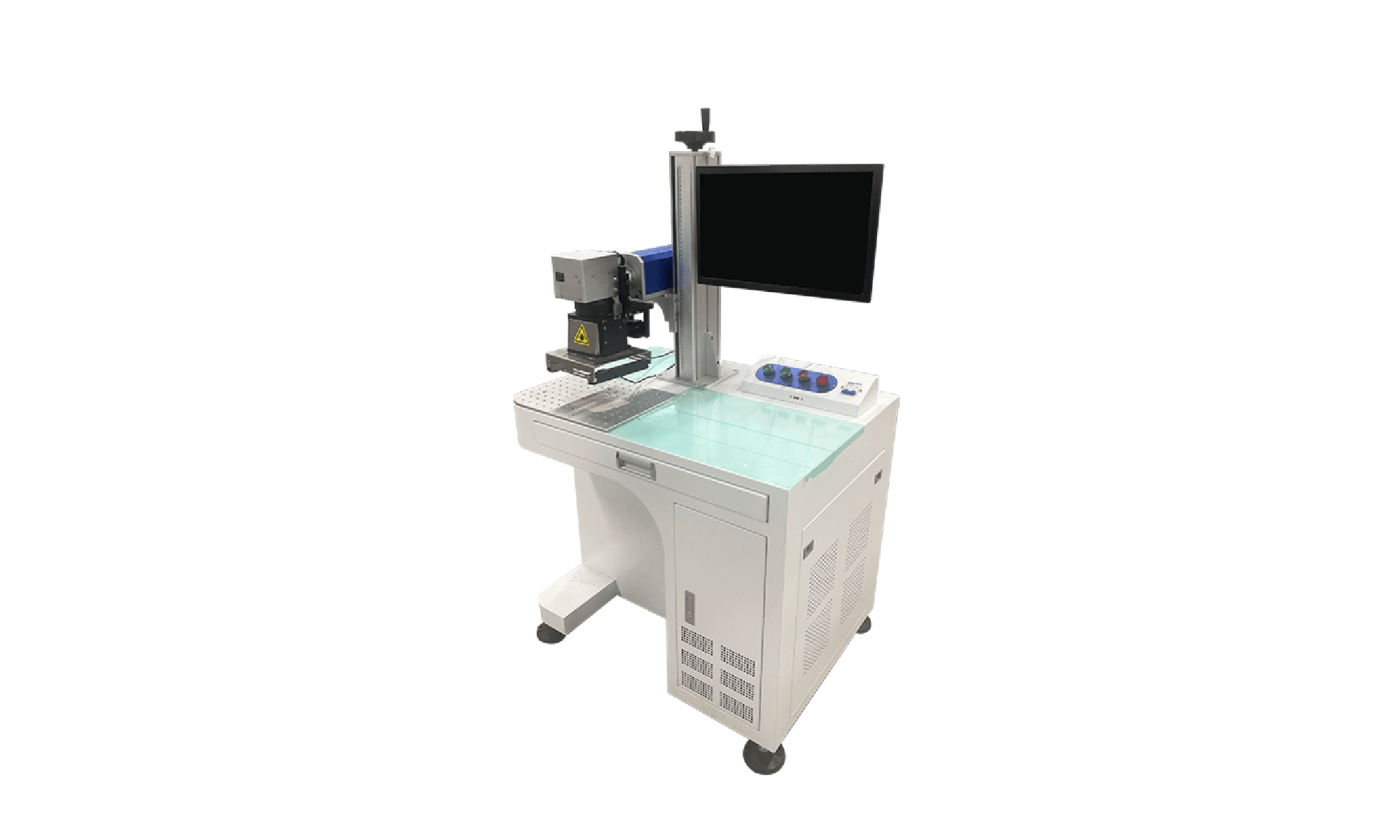
The most common configuration for job shops, small-batch production, R&D labs, and jewelry/custom engraving businesses. The laser source, galvo, and work area are housed in a single cabinet that sits on a desk or floor stand.
- Best for: Small to medium parts (<200 mm marking field), batch sizes from 1 to 1,000, mixed job work.
- Marking field: Typically 110×110 mm, 150×150 mm, or 200×200 mm (custom up to 300 mm).
- Pros: Most affordable, easiest to install, takes ~2 m² of floor space.
- Cons: Manual loading/unloading, not suited to very heavy or long parts.
2.2 Handheld / Portable Fiber Laser Markers
A relatively new form factor where the galvo head is mounted on a handheld gun connected to a portable backpack or wheeled base. Popular for marking large, heavy, or already-installed parts that cannot be brought to the machine — such as mold engraving, large metal frames, ship components, auto chassis VIN marking, and on-site repair traceability.
- Best for: Large/immovable parts, on-site marking, low-volume mixed work.
- Pros: Bring the laser to the part instead of vice versa; no fixture needed for flat surfaces.
- Cons: Hand-held consistency is operator-dependent; not recommended for high-speed production lines. For a deeper analysis, see handheld fiber laser marker pros, cons & use cases.
2.3 Flying / Online Fiber Laser Markers
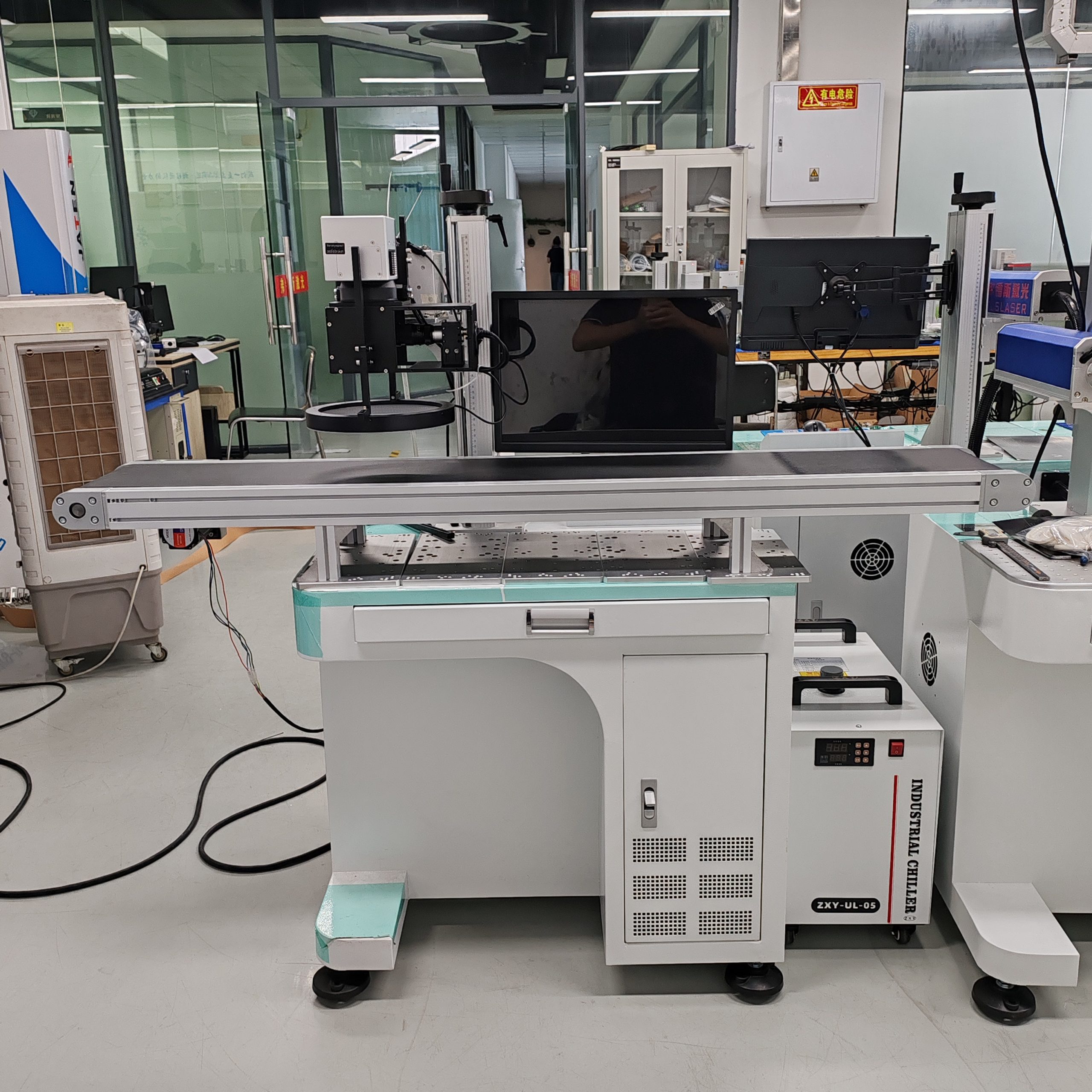
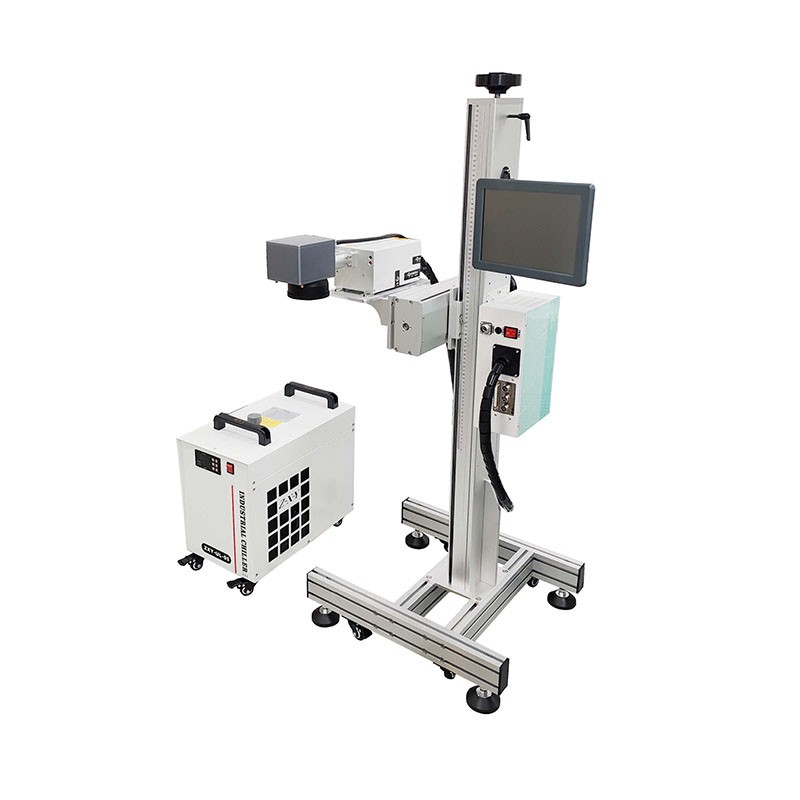
Designed for integration into conveyorized production lines. The laser marks parts as they move past the scan head at line speed — no stop-and-go, no manual loading. This is the configuration used by automotive, electronics, food & beverage packaging, and pharmaceutical factories for date coding, batch numbers, QR traceability, and UDI.
- Best for: High-volume continuous production, conveyor integration, in-line traceability.
- Key requirement: Encoder input to sync laser pulse with conveyor speed; otherwise marks smear.
- Pros: Zero manual labor, up to tens of thousands of parts per hour.
- Cons: Highest upfront cost; requires line integration. Learn more in our guide to flying fiber laser marking for production lines.
2.4 MOPA Fiber Lasers: The “Color Marking” Variant
Standard (Q-switched) fiber lasers have a fixed pulse duration in the 100–200 ns range. A MOPA (Master Oscillator Power Amplifier) fiber laser allows the pulse duration to be adjusted from 4 ns to 200 ns, which unlocks two major capabilities:
- Color marking on stainless steel and titanium — by tuning pulse width and frequency, you can produce gold, red, blue, green, and black marks without paint or chemicals.
- Black anodized aluminum marking with minimal surface damage, and improved contrast on certain plastics.
MOPA is not a separate machine “type” but a different laser source option available on benchtop, handheld, and flying models — typically 15–30% more expensive than Q-switched. If color marking or anodized aluminum is your primary use case, MOPA is worth the premium. For details, see MOPA vs Q-switched fiber lasers: which one you actually need.
📚 Deep-dive articles on each machine type
- How fiber lasers work
- Handheld fiber laser markers
- Flying/online laser integration
- MOPA vs Q-switched fiber lasers
3. Power Guide: 20W vs 30W vs 50W vs 100W
Wattage is the single most-discussed specification — and the most frequently over-specified. More power is not always better; the right wattage depends on material, required mark depth, cycle time, and line speed.
| Power | Best For | Max Depth (steel, single pass) | Typical Speed | Recommended Use Case |
|---|---|---|---|---|
| 20W | Shallow marking, annealing, plastics | 0.02–0.05 mm | 3,000–7,000 mm/s | Electronics, logos on stainless, small parts, plastic tags |
| 30W | All-round industrial work | 0.05–0.15 mm | 5,000–9,000 mm/s | Best balance: automotive parts, tools, general-purpose marking |
| 50W | Deep engraving, hard metals | 0.15–0.3 mm | 7,000–12,000 mm/s | Deep engraving, high-speed production, brass/copper, tool steel |
| 100W | Deep removal, thick metal, cutting | 0.3–0.8 mm | 8,000–15,000 mm/s | Mold/die engraving, heavy industry, thin-sheet cutting, jewelry deep relief |
Power Selection Rules of Thumb
- Start with 20W if you are marking serial numbers/QR codes on stainless steel consumer goods, or marking plastics. It is the lowest cost and more than sufficient for annealing black marks.
- Go with 30W as the default for general industrial use (our best-selling configuration). The extra 10W roughly doubles engraving depth and cuts cycle time by 30–40% on most jobs for a ~15–20% price premium. Full breakdown: 20W vs 30W fiber laser marking machines.
- Step up to 50W if you regularly engrave deeper than 0.1 mm, mark brass/copper (which reflect 1064 nm heavily), or run a flying line at high speed. See the comparison in 30W vs 50W: when the upgrade pays for itself.
- Only buy 100W if you have a confirmed need for deep engraving or material removal — 100W machines require water cooling, cost twice as much, and overkill will actually produce worse results on thin/sensitive materials. More: 50W vs 100W fiber lasers for industrial engraving.
Beware “over-wattage” scams. Some sellers advertise “50W” machines that actually ship with a 20W or 30W source and over-driven current. This shortens laser life dramatically and produces inconsistent marks. Always verify the laser source model plate against the manufacturer’s rated output.
4. Materials Fiber Lasers Can (and Cannot) Mark
The 1064 nm wavelength of fiber lasers is absorbed extremely well by metals and reasonably well by some engineering plastics, but poorly by organics, glass, and transparent materials.
Excellent Marking Quality (first choice)
| Material | Mark Type | Recommended Power | Notes |
|---|---|---|---|
| Stainless steel | Black annealing / deep engraving / color (MOPA) | 20W–50W | The most common application; annealed black marks are corrosion-resistant |
| Carbon steel / tool steel | Dark engraving, deep removal | 30W–100W | Deep engraving needs ≥50W |
| Anodized aluminum | White mark on black anodize | 20W–30W (MOPA preferred) | High contrast, very fast |
| Brass / copper | Engraving | 50W+ | High reflectivity needs higher power; mark immediately on power-up before full reflectivity sets in |
| Titanium | Annealed color / engraving | 20W–50W (MOPA for color) | Medical implants, aerospace parts |
| Carbide / coated tools | Dark engraving | 30W–50W | Cutting tool traceability |
For material-specific settings and parameter recipes, see our dedicated guides on marking stainless steel and marking aluminum and anodized parts.
Markable but Requires Optimization
- ABS, PC, PA (nylon), POM — most engineering plastics can be marked but need slower speeds and MOPA sources for best contrast. Additives (e.g., laser-sensitive pigments) dramatically improve results.
- Painted / coated metals — paint removal to reveal the underlying metal produces high-contrast day/night effects for buttons and dashboard parts.
- Ceramics (some) — limited success; alumina ceramics mark well with optimized parameters.
NOT Suitable for Fiber Lasers (use UV or CO₂ instead)
- Glass — fiber causes micro-cracking and poor contrast; use a UV laser marker.
- Wood, leather, fabric, paper — organics absorb 10.6 µm CO₂ wavelength far better; use a CO₂ laser marker.
- Transparent plastics (PMMA/Acrylic, PET) — fiber passes through; use UV or CO₂.
- Silicone — generally requires UV for consistent contrast.
- PCB substrates, thin films, medical-grade polymers — heat-affected zone is too large with fiber; use UV cold marking.
5. Key Industries & Applications
Fiber laser marking is used across virtually every manufacturing sector where permanent identification is required. The most common deployments we see at FLS Laser include:
Automotive Parts
Fiber laser marking is used across the automotive supply chain for VIN plates, component traceability codes, engine and chassis part IDs, and sensor housings. The 1064 nm fiber source produces permanent, abrasion-resistant marks on stainless steel, aluminium and coated alloys without consumables. In a typical production cell fitted with an FLS 30W fiber marker and inline conveying, one Tier-1 supplier moved from manual stamping to laser marking and reduced cycle time from 60s to 25s per part while cutting reject rates from 20% to 5%.
Medical Devices & Surgical Instruments
Medical marking must be permanent, legible and traceable, from UDI codes on implants and instruments to serial numbers on stainless-steel tools. Fiber marking delivers high-contrast, autoclavable marks; for heat-sensitive polymer housings, a 355 nm UV system provides cold processing with minimal thermal impact. A medical-device manufacturer marking surgical instruments achieved 98% first-pass read rate on 2D UDI codes and cut operator handling time by50%.
Electronics & Semiconductors
From PCB panels and connector housings to IC packages and micro-components, electronics manufacturers need micro-characters and mini QR codes that stay readable. FLS marking systems integrate CCD vision positioning and can connect to MES, PLC and databases for full traceability. A semiconductor customer applying micro-marks with a UV system reached a minimum line width of 10–60 µm (spec) and improved code read rate from 10% to 20%.
Aerospace
Part serialization and traceability on titanium and aluminum alloy components, fasteners, and turbine blades. Marks must survive extreme heat and pass NADCAP accreditation — this typically requires controlled-depth engraving with 30W–50W sources.
Hardware, Tools & Metal Components
Hand tools, fasteners, bearings, valves and machined parts are marked for branding, batch codes and anti-counterfeit traceability. Fiber lasers mark directly on metal with no ink or consumables, at speeds up to 7,000 mm/s (spec) and accuracy within 0.01 mm (spec). A hardware manufacturer replaced inkjet coding with an FLS fiber marker and reduced per-part marking cost by 28% while eliminating code-fade complaints.
Jewelry, Watches & Premium Consumer Goods
Fine marking on precious metals, anti-counterfeit micro-codes, and decorative surface effects let brands protect authenticity and lift perceived value. Colorful laser etching creates colors and optical effects directly on metal — no ink, coating or spraying. A watch-component maker added laser personalization and reported a 50% uplift in average selling price on customized lines. For parameter details, see our guide to color laser marking on stainless steel.
New Energy & Battery Components
Busbars, tabs, battery cell casings and module housings require durable, traceable marks that survive downstream processes. Fiber marking on aluminium and copper delivers permanent data-matrix codes, and the same platforms support the precision welding used on current-collector and tab assemblies. A battery-parts line integrating laser marking and welding reported a 30% reduction in process steps and a 9-month payback period.
Other Major Verticals
- Metal fabrication & sheet metal — part numbers, bend line markers, job IDs
- Oil & gas — deep engraved tags for downhole tools and valves
- Food & beverage packaging — date/batch codes on metal cans and caps (flying fiber)
- Firearms — ATF-compliant serial number engraving (50W minimum in most jurisdictions)
6. Fiber Laser Marking Machine Price (2026 Guide)
Pricing varies dramatically based on laser source brand, wattage, form factor, automation level, and whether you are buying from a trading company or directly from the manufacturer. Below is a realistic 2026 factory-direct price range for machines meeting CE/FDA/ISO quality standards.
| Configuration | Price Range (USD) | Typical Laser Source | Notes |
|---|---|---|---|
| 20W benchtop, entry-level | $2,800 – $4,500 | Raycus / MAX | Good for small shops; air-cooled; basic safety enclosure |
| 30W benchtop, industrial | $4,200 – $6,500 | Raycus / JPT / MAX | The volume sweet spot; most job-shop and factory orders |
| 50W benchtop / floor-standing | $5,800 – $9,500 | Raycus / JPT / IPG | Deep engraving; optional motorized Z-axis, rotary axis |
| 20W–30W MOPA (color) | $5,200 – $8,500 | JPT M7 / M8 | Color marking on stainless, better plastic contrast |
| Handheld portable 20W–50W | $4,500 – $9,000 | Raycus / JPT | Battery or AC-powered; for large/immovable parts |
| 30W–50W flying / in-line | $8,500 – $18,000 | Raycus / JPT / IPG | With conveyor, encoder, sensor, PLC integration |
| 100W deep engraver | $12,000 – $25,000 | JPT / IPG | Water chiller included; mold & die work |
| Premium IPG-source (any wattage) | +$3,000 – $8,000 premium | IPG (USA) | Longest rated life; common choice for EU/US buyers |
What Drives Price Differences Between Suppliers?
- Laser source brand: IPG (USA) > JPT (China, premium) > Raycus / MAX (China, value). All can produce good marks; IPG offers longer rated life and better global support.
- Galvo brand: Scanlab (Germany) vs Sino-Galvo (China) vs no-name — this directly affects marking speed, accuracy, and field distortion.
- Safety & certification: Class-1 fully enclosed machines with CDRH certification cost more but are legally required for commercial use in the US/EU.
- After-sales support: A supplier that provides English-speaking engineers, on-site installation, and 2-year warranty is not directly comparable to one that ships “as-is” from a trading platform.
Why are some machines on marketplaces under $2,000? Typically they use no-name laser sources that fail within 5,000–10,000 hours (vs 100,000 hours for name brands), low-quality galvos with poor repeatability, non-compliant safety enclosures, and no after-sales support. For a production environment, these machines usually cost more in downtime and rework than they save upfront. For a detailed breakdown of what to budget for, read fiber laser marking machine price: what you actually pay for in 2026.
7. How to Choose the Right Machine for Your Workflow
Use this decision sequence to avoid the most common purchasing errors:
Step 1: Define Your Primary Material
If metals are ≥70% of your work → fiber laser (you are on this page).
If glass, PCB, medical plastics, or thin films dominate → go to UV laser markers.
If wood, leather, acrylic, or fabric dominate → go to CO₂ laser markers.
Step 2: Define Production Volume & Part Handling
- 1–100 parts/day, variable sizes → benchtop
- 100–5,000 parts/day, uniform parts on conveyor → flying/online
- Large/immovable/already-installed parts → handheld
- R&D / lab use → benchtop with multiple lens options
Step 3: Define Mark Depth & Required Contrast
Surface anneal (black on stainless, no depth) → 20W sufficient.
Shallow engraving (0.05–0.1 mm, most QR codes/logos) → 30W ideal.
Deep engraving (0.1–0.3 mm, tool bits, firearms, molds) → 50W.
Deep relief & material removal (>0.3 mm) → 100W.
Step 4: Color, Anodized Aluminum, or Delicate Plastics?
If yes, specify MOPA source (JPT M7/M8) rather than Q-switched.
Step 5: Budget for the Complete System, Not Just the Machine
Don’t forget: rotary axis (for circular parts), fume extractor (required for plastic/brass marking), air compressor (for air knives on lenses), spare lenses and mirrors, safety glasses, installation & training, and shipping/import duties.
Free sizing service: Send us 3–5 of your actual parts, we mark them in our Dongguan factory and ship the samples back to you with a recommended configuration and cycle-time report — no charge. Request free sample marking.
8. Installation, Safety & Maintenance
Installation Requirements
- Power: Standard 110V/220V single-phase for benchtop 20W–50W; 100W needs 220V and dedicated circuit.
- Space: Benchtop ~1 m × 1 m table space + clearance; floor models ~1.5 m × 1.5 m.
- Environment: Clean, low-dust, 10–35 °C, <80% humidity. Avoid vibration (do not place next to stamping presses or CNC machines).
- Fume extraction: Required for any plastic, painted, or coated-metal marking; metal-only marking in a ventilated room is acceptable but still recommended.
Safety: Class-1 vs Class-4 Operation
1064 nm fiber laser radiation is invisible and can cause permanent eye damage and skin burns before you feel any heat. Rules to follow:
- Always operate inside a Class-1 fully enclosed cabinet with interlocked doors for production use.
- If using an open-bed or handheld unit, always wear OD7+ laser safety glasses rated for 1064 nm; never allow anyone in the beam path without eye protection.
- Never mark PVC — it releases chlorine gas that will corrode the machine and is a health hazard.
- Ensure operators receive proper safety training before independent use.
Routine Maintenance Schedule
| Frequency | Task | Time Required |
|---|---|---|
| Daily | Clean f-theta lens with lens tissue + isopropyl alcohol; empty fume extractor filters | 5 minutes |
| Weekly | Check cooling fan/air filter; inspect cable connections; clean work area | 10 minutes |
| Monthly | Check beam alignment; lubricate linear guides; verify emergency stops | 20 minutes |
| Annually | Professional service: laser power calibration, galvo calibration, replace air filter elements | 1 hour |
| As needed | Replace f-theta lens if scratched; replace laser source at ~100,000 hours (11+ years single shift) | — |
Full checklist: Fiber laser marking machine maintenance checklist & schedule.
9. Fiber vs UV vs CO₂: Which One Do You Need?
This is the single most common question from buyers new to laser marking. The three technologies are not competitors in the strict sense — they are optimized for different material families.
| Parameter | Fiber Laser (1064 nm) | UV Laser (355 nm) | CO₂ Laser (10.6 µm) |
|---|---|---|---|
| Best materials | All metals, engineering plastics | Glass, PCB, thin plastics, medical polymers, ceramics, silicone | Wood, leather, fabric, paper, acrylic, organic materials |
| Marking mechanism | Heating/annealing/ablation | Cold ablation (photochemical, minimal heat) | Thermal vaporization |
| Heat-affected zone | Small | Ultra-small (“cold marking”) | Moderate |
| Typical power | 20–100W | 3W–10W | 30W–100W |
| Entry price | $2,800+ | $8,500+ | $3,500+ |
| Common uses | Metal parts, tools, automotive, hardware | Medical UDI, glass marking, electronics, flexible packaging | Wood crafts, leather goods, acrylic signage, food packaging |
Decision Flowchart
- Do you mark metals 80%+ of the time? → Fiber.
- Do you mark glass, PCB, or medical plastic? → UV.
- Do you mark wood, leather, fabric, acrylic? → CO₂.
- Do you need to mark a mix of metals AND plastics/glass? → Consider a two-laser system (fiber + UV) or two separate machines (usually more economical than combo units).
For a deeper side-by-side with material-by-material recommendations, see our master comparison: Fiber vs UV vs CO₂ laser marking: which one for your material. If your primary material mix points toward UV, start with the UV laser marking machine pillar page.
10. Frequently Asked Questions
What wattage fiber laser marking machine do I need?
20W covers most shallow marking and annealing on metals and plastics. 30W is the best all-rounder for general industrial use and deep engraving on stainless steel, offering ~30–40% faster cycle time for a modest price premium. 50W is needed for deep engraving on harder metals (tool steel, brass, copper) and high-speed flying production lines. 100W is reserved for very deep engraving (molds, dies), bulk material removal, and thick-metal applications. For a quick self-assessment, see our 20W vs 30W and 30W vs 50W comparisons.
How much does a fiber laser marking machine cost?
In 2026, a good-quality entry-level 20W benchtop fiber laser marker costs $2,800–$4,500 factory-direct. Mid-range 30W–50W industrial units run $4,500–$8,500. Industrial 50W–100W flying or handheld models are $8,500–$25,000+. Machines priced under $2,000 on generic marketplaces typically use no-name laser sources and are not recommended for production use. Full pricing breakdown by configuration: fiber laser marking machine price guide 2026.
What materials can a fiber laser mark?
Fiber lasers (1064nm wavelength) excel at marking all metals: stainless steel, carbon steel, aluminum (including anodized), brass, copper, titanium, tool steel, carbide, and precious metals. They also mark most engineering plastics (ABS, PC, PA, POM) with adjusted settings, painted/anodized surfaces, and some ceramics. They are not suitable for glass, wood, fabric, leather, transparent plastics (acrylic, PET), or silicone — for those, use UV (glass, PCB, medical) or CO₂ (organics, wood, acrylic).
How long does a fiber laser marking machine last?
A quality fiber laser source (Raycus, JPT, MAX, IPG) is rated for 100,000+ hours of MTBF, which equals roughly 11+ years of single-shift (8-hour) operation. With proper lens cleaning, stable power, and recommended cooling, the galvanometer and machine body typically outlast the laser source itself. Budget no-name sources often fail within 5,000–15,000 hours.
Is fiber laser marking permanent?
Yes — fiber laser marking is permanent and indelible. The laser physically alters the material surface through annealing (oxide layer), engraving (material removal), or foaming (plastic color change). Marks resist abrasion, heat, chemicals, oil, and solvents, which is why fiber laser marking is the mandated standard for aerospace components, automotive traceability, medical device UDI, and firearm serial numbers.
Can a fiber laser mark color on stainless steel?
Yes — but only with a MOPA fiber laser (not standard Q-switched). By tuning pulse duration (4–200 ns) and frequency, MOPA sources can produce gold, red, blue, green, purple, and solid black marks on polished stainless steel and titanium. This is widely used in jewelry, kitchenware, and premium consumer goods. See color laser marking on stainless steel: the full parameter guide.
Do I need a rotary axis?
If you mark any cylindrical or circular parts (rings, bearings, pipes, pens, tubes), yes. A rotary axis (4th axis) rotates the part in sync with the laser so the mark lays flat around the circumference. Most FLS machines ship with rotary-axis-ready controllers; the rotary itself is a $400–$800 add-on.
Will a fiber laser cut metal?
Marking machines are not designed for cutting. A 50W–100W fiber marker can cut thin foils (<0.3 mm) slowly, but for serious sheet-metal cutting you need a dedicated fiber laser cutter (500W+), which is a completely different machine class and price point.
Fiber vs UV vs CO₂ laser marking — which should I buy?
Choose fiber for metals and engineering plastics, UV for heat-sensitive materials (glass, PCB, thin plastics, medical devices), and CO₂ for organic materials (wood, leather, fabric, acrylic). If you primarily mark metal parts, fiber is the default choice. For a complete side-by-side with material recommendations, see Fiber vs UV vs CO₂ laser marking: the definitive comparison.
📚 Continue exploring the Fiber Laser knowledge hub
- How fiber lasers work (technology deep dive)
- 20W vs 30W fiber laser
- 30W vs 50W fiber laser
- 50W vs 100W fiber laser
- Fiber laser pricing (full breakdown)
- Marking stainless steel (settings)
- Marking aluminum & anodized parts
- MOPA vs Q-switched fiber lasers
- Color marking on stainless steel
- Handheld fiber laser markers
- Flying/online laser for production lines
- Maintenance checklist & schedule
- Fiber vs UV vs CO₂ comparison
- → UV laser marking machine pillar page
Ready to Spec Your Fiber Laser Marking Machine?
FLS Laser is a Dongguan-based ISO 9001 certified manufacturer with 15+ years of fiber, UV, and CO₂ laser marking experience. All machines carry CE/FDA certification, a 2-year warranty, and lifetime remote support.
Send us your parts for a free, no-obligation sample marking — we’ll return marked samples with a detailed configuration recommendation and cycle-time report.Request Free Sample Marking →
Or browse our full fiber laser product line: Fiber Laser Marking Machines